

The Switch Actor
Utilize the Switch Actor to quickly switch the visibility of it’s child actors.
TezenariUpdated 3 years ago|
Actors
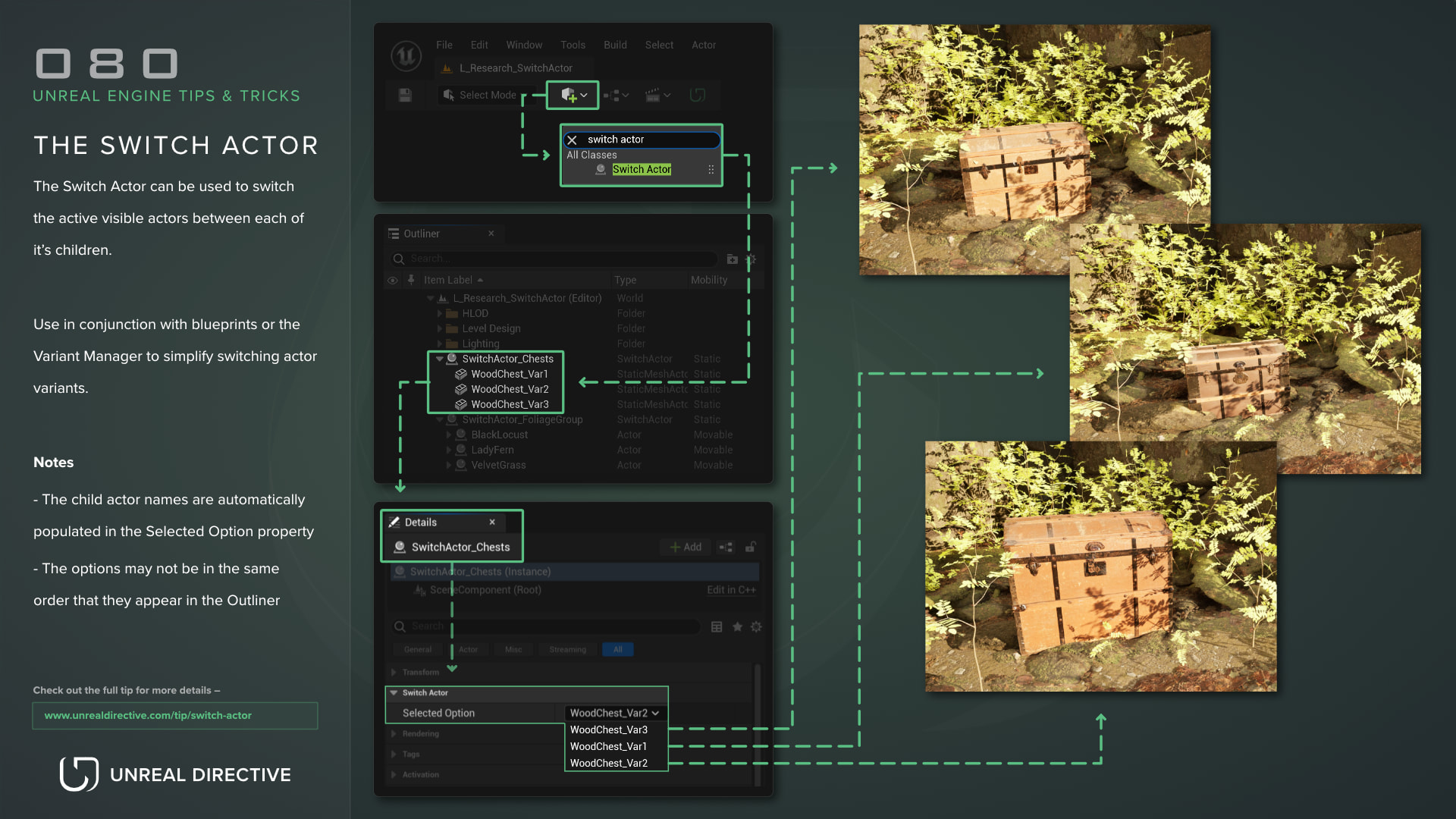
The Switch Actor can be used to switch the active visible actor between each of it’s children.
Use in conjunction with blueprints or the Variant Manager to simplify switching actor variants.
Notes
- The child actor names are automatically populated in the Selected Option property
- The options may not be in the same order that they appear in the Outliner
06/More Tips
Temporarily Change Actor Pivot
Viewport
Actors
+1
Actor Snapping ShortcutsSave yourself from actor alignment annoyances by using these handy snapping shortcuts!
Actors
Shortcuts
+1
DumpticksDump actors that are ticking to your log using this console command
Console Commands
Profiling
+2
Custom Primitive DataLearn how you can use Custom Primitive Data to easily modify Scalar and Vector material parameters without needing Dynamic Material Instances.
Materials
Static Meshes
+2
The Visual LoggerUtilize the Visual Logger to capture, visualize, and debug in-game events.
Profiling
Post Process PixelizationLearn how to quickly create a Pixel Shader effect for your Unreal Engine project.
Shaders
Materials
+1