

Custom Primitive Data
Use Custom Primitive Data to change scalar and vector material parameters per component without Dynamic Material Instances.

Custom Primitive Data is a helpful feature within Unreal Engine that allows you to easily modify Scalar and Vector parameters within Materials without the need to setup Material Instances or Dynamic Material Instances during runtime.
This is primarily due to the data being stored on the Primitive Component itself, such as a Static or Skeletal Mesh Component, instead of the material. In addition, every mesh keeps using the same material, so the renderer can still instance them together. That means fewer draw calls for duplicate geometry within your scene than giving each mesh its own Dynamic Material Instance.
Setup for primitive component
- Select the desired Scalar and Vector Parameter nodes within a material of your choosing

- In the parameter’s Details Panel, enable the “Use Custom Primitive Data” option and set the “Primitive Data Index” option to an unused index

-
Apply the material to a Primitive Component that can be assigned a material, such as a Static or Skeletal Mesh Component
-
Modify the values under Rendering → “Custom Primitive Data Defaults” in the Primitive Component’s Details Panel, or via the “Set Custom Primitive Data” functions in C++, Blueprint, or Python

Here are the functions you’ll use most:
| Function | Description |
|---|---|
| Set Custom Primitive Data Float, Vector2, Vector3, Vector4 | Set values by index at runtime. These values aren’t saved. |
| Set Scalar/Vector Parameter for Custom Primitive Data | Set a value by parameter name instead of index, at runtime. |
| Set Default Custom Primitive Data Float, Vector2, Vector3, Vector4 | Set the saved default values. Ideal for construction scripts. |
| Setup Default Custom Primitive Data From Materials | Fills the defaults with the parameter default values from the assigned materials. |
Setup for instance component
- Add “Per Instance Custom Data” and “Per Instance Custom Data 3 Vector” nodes to your material

- In each node’s Details Panel, adjust the “Const Default Value” option and set the “Data Index” option to an unused index

-
Apply the material to a Static Mesh that will be instanced, such as in an Instanced Static Mesh or Hierarchical Instanced Static Mesh Component
-
Modify the “Custom data” option via the instance in the Details Panel or via the “Set Custom Data Value” function in C++, Blueprint, or Python

Additional information
Here’s how a material’s parameters map onto a component’s Custom Primitive Data indices:
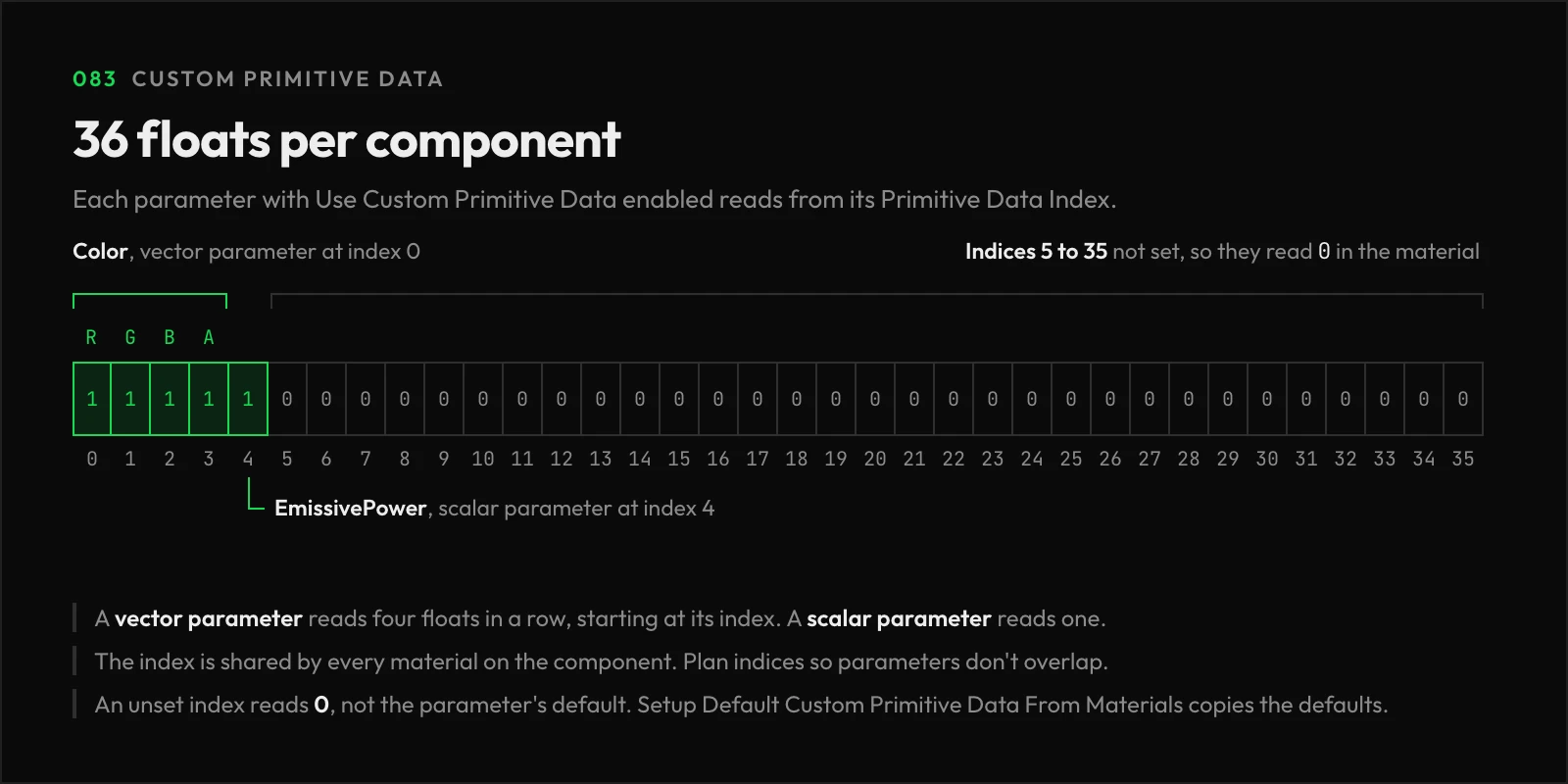
- The Primitive Data Index serves as a distinct identifier for a property across ALL materials on a Primitive Component. So, if you assign the same Primitive Data Index to Scalar or Vector parameters in multiple materials, they will all share that value.
- A Scalar Parameter uses one index, while a Vector Parameter uses four in a row, one per channel. A vector at index 2 takes indices 2 through 5, so plan your indices to avoid overlap.
- In Unreal Engine 5.8, a component has 36 Custom Primitive Data floats, indices 0 through 35. Epic’s documentation still lists the older limit of 32.
- Any index that hasn’t been set reads as
0in the material, not the parameter’s default value. Call “Setup Default Custom Primitive Data From Materials” to copy the defaults over. - The “Per Instance Custom Data 3 Vector” node reads three indices in a row, starting at its Data Index, and its node title shows which ones. Both Per Instance Custom Data nodes return their Const Default Value when the mesh isn’t drawn as an instance.
- Run
stat scenerenderingto check how many mesh draw calls your scene uses.
Links
Check out the following resources to learn more about the subject.
Unreal Directive is free and ad-free.
If it saved you time, you can help keep it that way.