

The Format Text Node
Use the Format Text node to insert variable values into text for UI or debug output.

When needing to display property information in text elements for UI, or for debugging with Print Text, the Format Text node is the go-to solution.
For each word wrapped in curly brackets in the Format pin, such as {Health}, a new input with that name is added to the Format Text node. This allows you to add any type of information anywhere you need within a text statement.
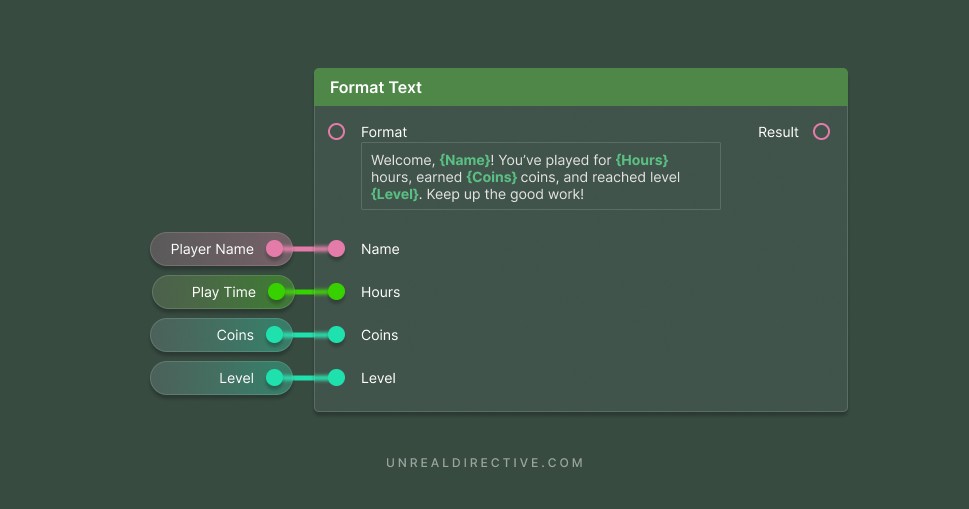
Since Format Text outputs Text, the result stays localizable, and translators see the whole sentence with its placeholders instead of loose fragments.
What variable types does the Format Text node support?
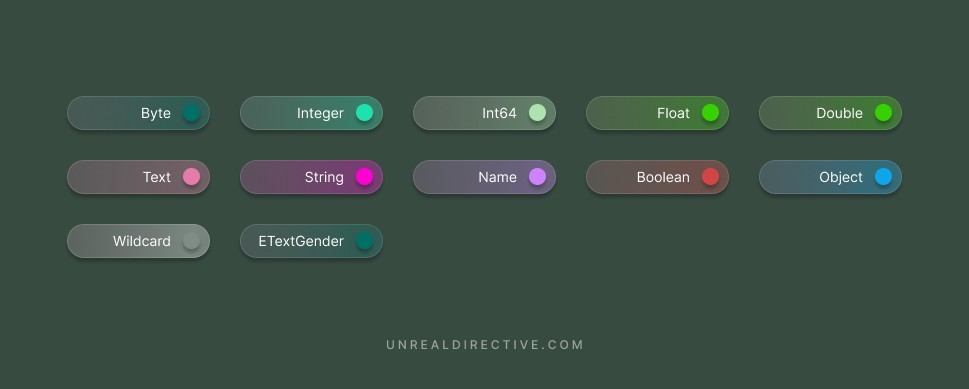
The Format Text node supports 12 different variable types:
- Byte
- Integer
- Int64
- Float
- Double
- Text
- String
- Name
- Boolean
- Object
- Wildcard
ETextGenderenumerator
When it comes to Object variable types, it uses the object’s name, such as BP_Door_C_0, which isn’t always the label you see in the Outliner. A null object prints None, and Booleans print as true or false.
Do note that this only includes single variables, not arrays, sets, or maps.
What if the format text comes from another pin?
The node only adds inputs automatically when the Format pin holds a literal value. When the Format pin is connected to another node, an Add pin button appears on the node instead, so add the arguments yourself and name each one to match its placeholder.
Can the text change with the value?
Yes. Format arguments support modifiers after a pipe character. Here are the ones available:
| Modifier | Example | Description |
|---|---|---|
plural | {Count} {Count}|plural(one=item,other=items) | Picks a word based on a number, using the current culture’s rules. |
ordinal | {Place}{Place}|ordinal(one=st,two=nd,few=rd,other=th) | Picks a suffix for ordinal numbers like 1st or 2nd. |
gender | {Gender}|gender(his,her) | Picks a word based on an ETextGender value. |
How do I show a literal curly bracket?
Escape it with a backtick. The same goes for a literal pipe.
Links
Check out the following resources to learn more about the subject.
Unreal Directive is free and ad-free.
If it saved you time, you can help keep it that way.