

Custom Material UVs
Move texture UV math from the pixel shader to the vertex shader with the Customized UV material inputs.
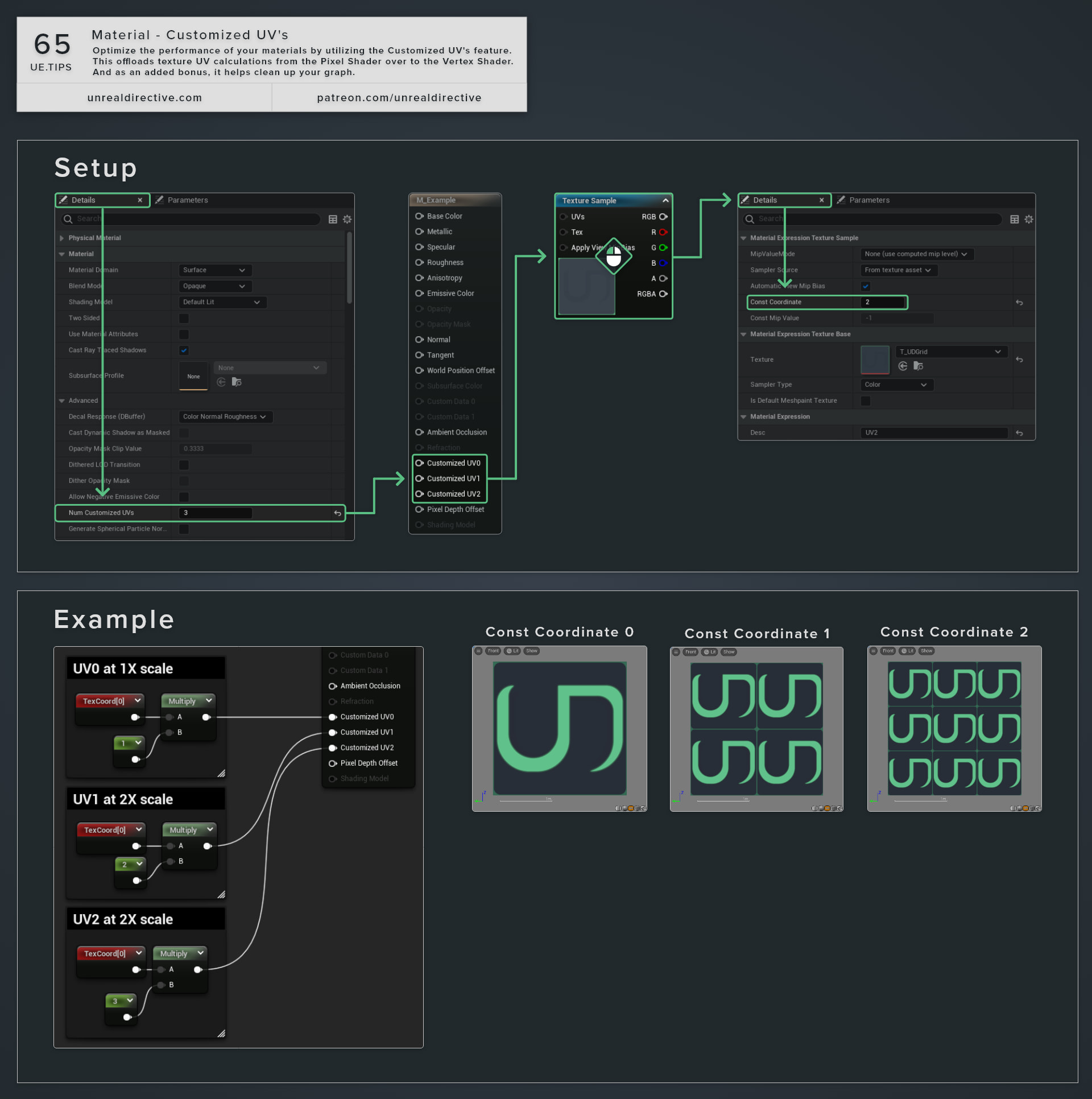
Optimize the performance of your materials by using the Customized UVs feature. This moves texture UV calculations from the pixel shader over to the vertex shader. And as an added bonus, it helps clean up your graph.
How do I enable customized UVs?
- Open the material and select the main material node.
- In the Details panel, expand the advanced options of the Material category.
- Set
Num Customized UVsto the number of UV channels you want to override.
The main material node then shows one input pin per channel, from Customized UV 0 up to Customized UV 7, so Unreal Engine 5.8 gives you 8 at most.
Which UV channel does each pin override?
Whatever you plug into Customized UV 0 is what a TexCoord node with a Coordinate Index of 0 returns in the rest of the material. Texture Sample nodes read TexCoord 0 by default, so they pick up the customized value without any extra wiring. Any pin you leave unconnected passes the mesh’s own UVs through unchanged.
Frequently asked questions
Does every kind of UV math work here?
Linear math, like the multiply and add you use for tiling and offsets, gives you the same result as doing it in the pixel shader. The math runs once per vertex and gets blended across each triangle, so non-linear math like sin, cos, squaring, or length depends on how dense the mesh is and looks wrong on low-poly meshes.
Is it always cheaper?
Usually, since pixels on screen tend to far outnumber vertices, and that’s where the savings come from. However, a dense mesh without LODs can flip that around, because its vertex work stays the same no matter how far away the mesh is.
Which meshes support it?
Epic’s documentation lists Static Meshes, Skeletal Meshes, BSP, Landscape, and mesh particles. Sprite particles don’t support Customized UVs.
What about values that aren’t UVs?
Use the Vertex Interpolator node for those. It shares the same interpolator budget as Customized UVs.
Links
Check out the following resources to learn more about the subject.
Unreal Directive is free and ad-free.
If it saved you time, you can help keep it that way.