

Regulate Emissive Exposure
Use the EyeAdaptation or EyeAdaptationInverse material nodes to keep emissive brightness consistent across exposure levels.
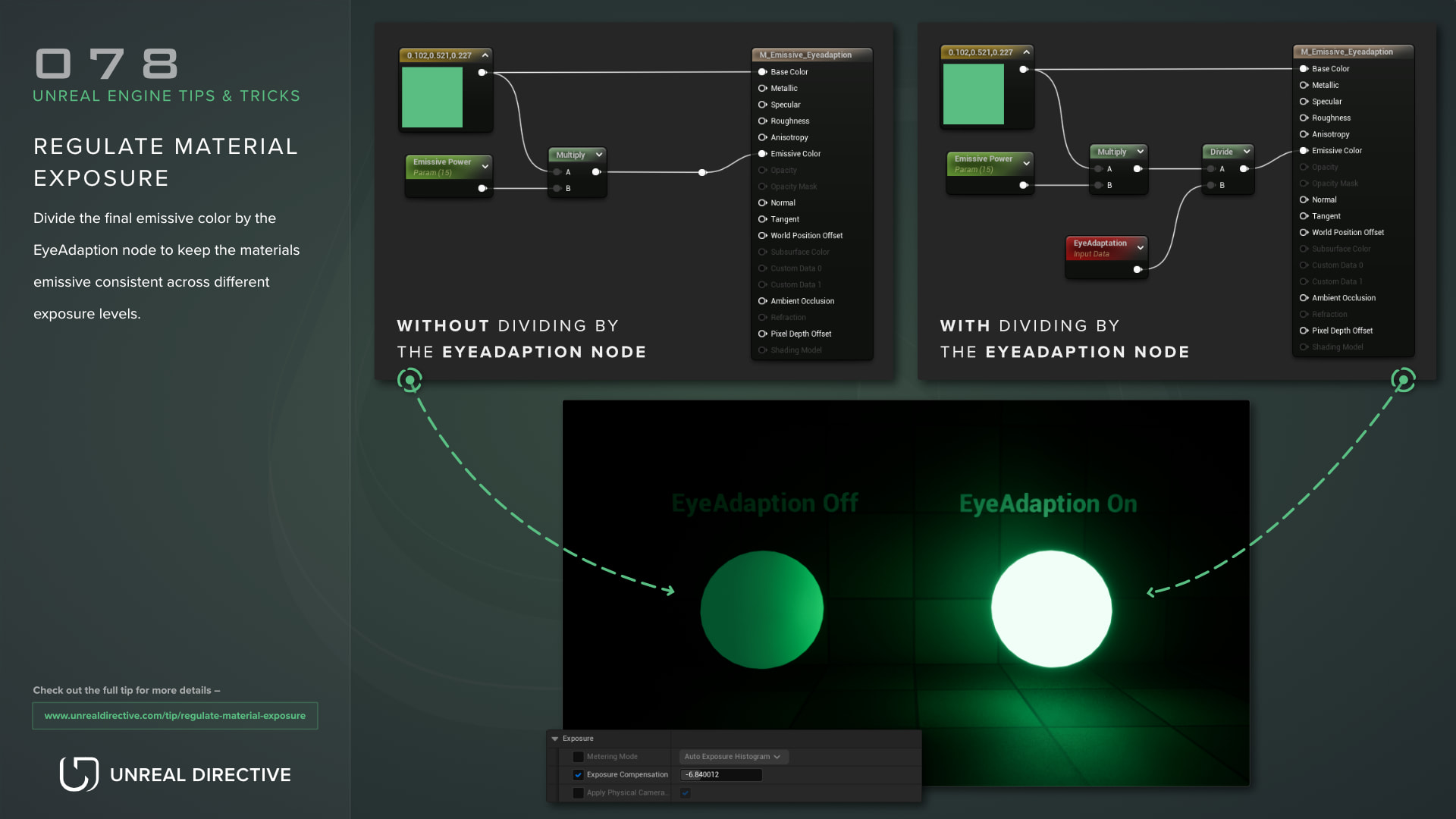
Divide the final emissive color by the EyeAdaptation node to keep the material’s emissive consistent across different exposure levels.
The EyeAdaptation node outputs the current exposure multiplier from auto exposure. Since the scene’s brightness is scaled by that value, dividing the emissive by it cancels out the exposure change for that material.
Example
In this example, the exposure level is being adjusted by a Post Process Volume. As you can see, the material that has its final emissive value divided by the EyeAdaptation node stays at the same brightness on screen while the exposure changes.
Is there a node that does the division for me?
Yes. Unreal Engine 5.8 also has an EyeAdaptationInverse node that handles it for you.
| Input | Default | Description |
|---|---|---|
LightValueInput | 1,1,1 | The color to compensate. Connect your emissive color here. |
AlphaInput | 1.0 | How much compensation to apply. 1.0 is full compensation, 0.0 is none. |
The alpha blends between no change and fully dividing by the exposure, so values between 0 and 1 let the emissive still react a little to exposure changes. Keep in mind that the alpha expects a single float, and connecting a vector to it gives a compile error.
The node also only works in the pixel shader, so connecting it to a vertex input such as World Position Offset gives a compile error as well. On the mobile renderer, the exposure value comes from the previous frame.
Links
Check out the following resources to learn more about the subject.
Unreal Directive is free and ad-free.
If it saved you time, you can help keep it that way.