

Blueprint Function Input Variable Nodes
Read a Blueprint function's inputs as standalone Get nodes instead of running wires back to the entry node.
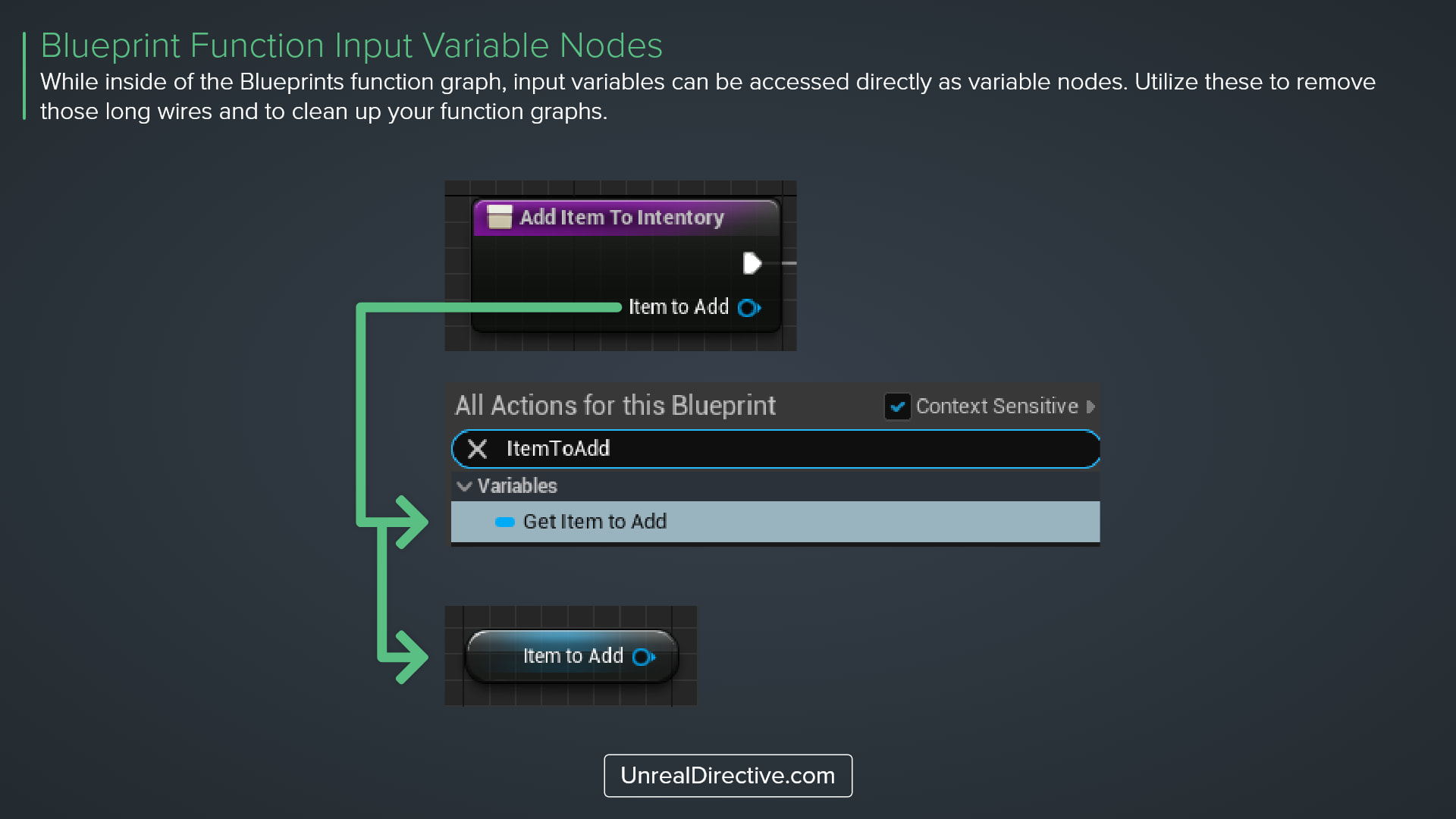
While inside of a Blueprint function’s graph, input variables can be accessed directly as variable nodes. Right-click in the graph, search for the input’s name, and place the Get node wherever you need the value.
Use these to remove those long wires running back to the entry node and to clean up your function graphs.
Here’s what you can access this way:
| Item | Get Node | Set Node |
|---|---|---|
| Function inputs | Yes | No |
| Pass-by-reference inputs | Yes | No |
| Local variables | Yes | Yes |
| Function outputs | No | No |
Frequently asked questions
Where can I use input Get nodes?
In Blueprint function graphs, including interface functions the Blueprint implements. Macros and the Event Graph don’t offer them.
Can I change an input’s value?
The right-click menu only offers a Get node for inputs, so to change a value partway through the function, copy it into a local variable first and work with that.
Links
Check out the following resources to learn more about the subject.
Unreal Directive is free and ad-free.
If it saved you time, you can help keep it that way.