

Show All Redirectors
TezenariUpdated 4 years ago|
Assets
Best Practices
Content Browser
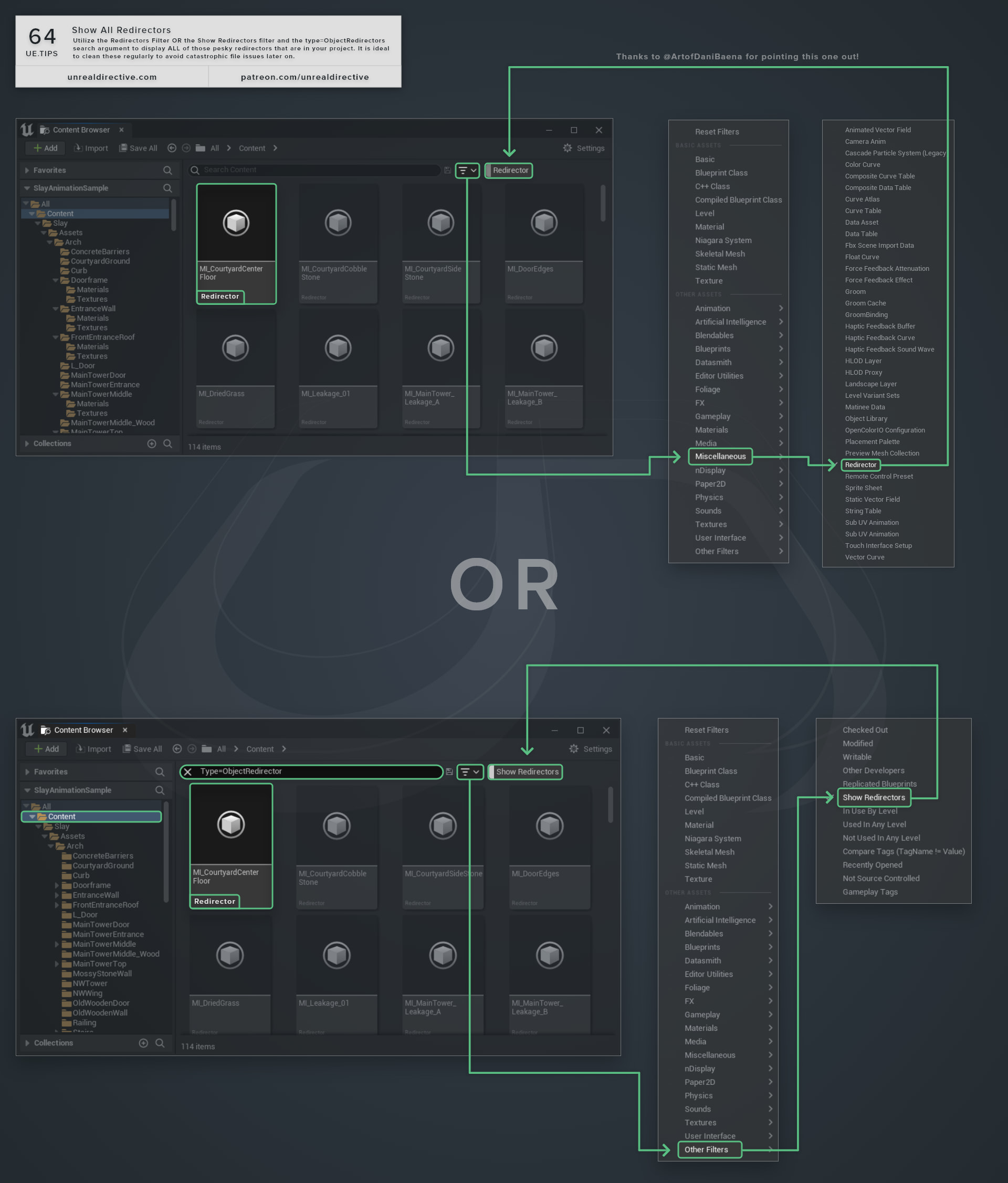
Utilize the Redirectors Filter OR the Show Redirectors filter and the type=ObjectRedirectors search argument to display ALL of those pesky redirectors that are in your project.
It is ideal to clean these regularly to avoid catastrophic file issues later on.
06/More Tips
Getter & Setter FunctionsUtilize Getter and Setter functions to interact with variables in other objects.
Best Practices
Functions
+1
Object Validation
Variables
Blueprints
+1
The Asset PickerUtilize the Asset Picker to quickly find, open, move, copy, or place assets from anywhere within the editor.
Editor
Shortcuts
+1
Function Parameter DescriptionsAppend parameter descriptions to your functions by using C++ comment tags
Blueprints
C++
+2
Content Browser Quick SearchSpeed up finding and opening assets within the content browser.
Content Browser
Utility
Custom Primitive DataLearn how you can use Custom Primitive Data to easily modify Scalar and Vector material parameters without needing Dynamic Material Instances.
Materials
Static Meshes
+2