

The Switch Actor
Use the Switch Actor to show one of its child actors at a time.
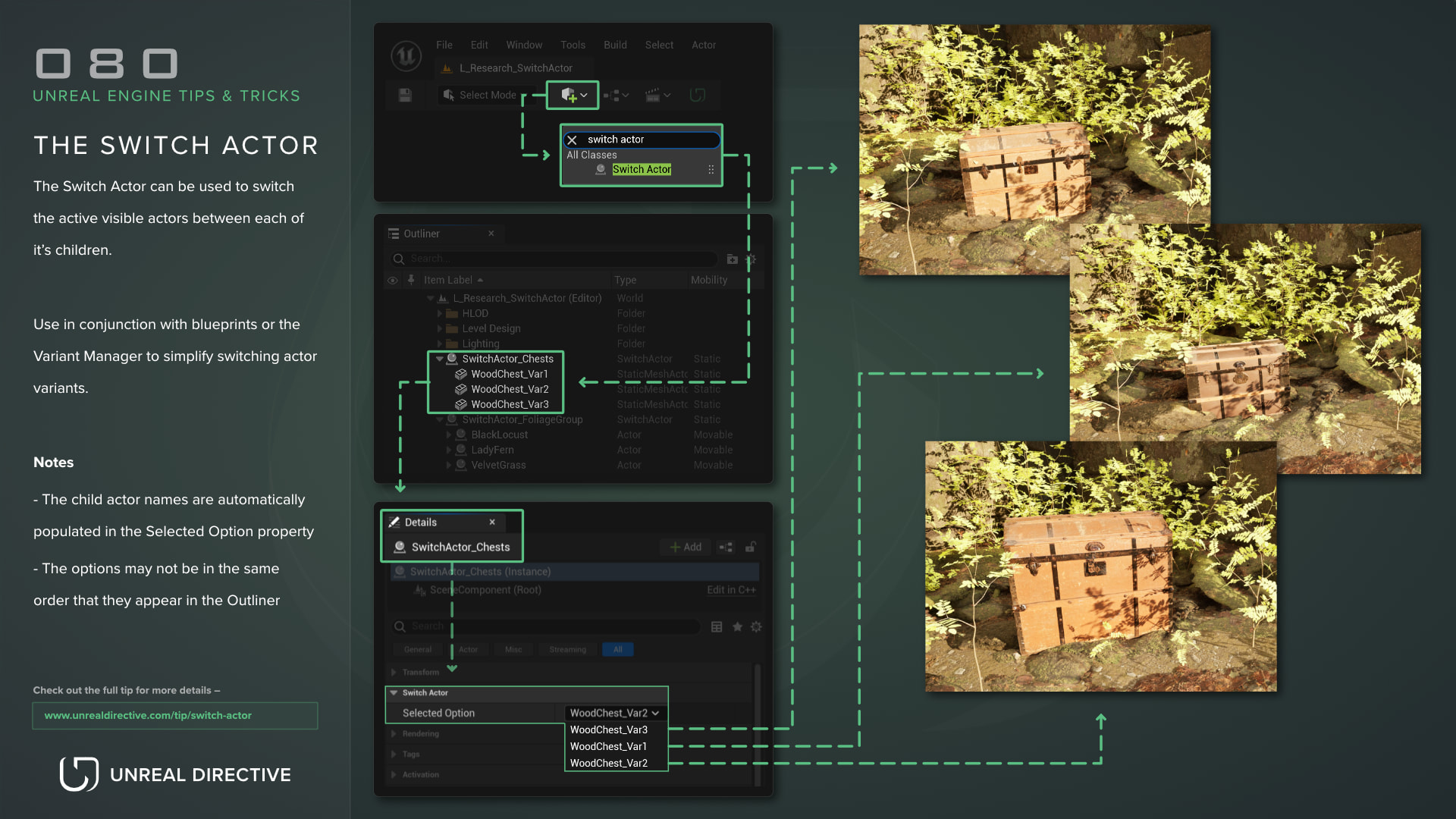
Use the Switch Actor to switch the active visible actor between each of its children.
Use it in conjunction with Blueprints or the Variant Manager to simplify switching actor variants, instead of toggling each actor by hand.
How do I set up a Switch Actor?
The Switch Actor comes from the Variant Manager Content plugin, which is enabled by default and marked Beta in Unreal Engine 5.8.
- Find the Switch Actor in the All Classes tab of the Place Actors panel and drag it into the level
- Attach your variant actors to the Switch Actor in the Outliner
- Pick the visible child from the Selected Option dropdown in the Details panel
The child actor labels are automatically populated in the Selected Option dropdown.
Can I switch options with Blueprints?
Yes. Here are the functions the Switch Actor has:
| Function | Description |
|---|---|
| Select Option | Shows the child at the given index and hides the others. |
| Get Selected Option | Returns the index of the currently selected child. |
| Get Options | Returns the child actors in the order the indices refer to. |
All three also show up as buttons in the Details panel, so you can call them in the editor.
Frequently asked questions
Why are the options in a different order than the Outliner?
The options are sorted by each actor’s object name rather than its label, so the order can differ from what you see in the Outliner. Use Get Options to check which index belongs to which child.
Are the hidden children disabled?
No. Switching only changes the visibility of each child’s root component and the components attached to it. Hidden children keep their collision and keep ticking.
Can Switch Actors be nested?
Yes. A child Switch Actor only shows its selected option while it’s the selected option of its parent.
How does the Variant Manager use it?
The Variant Manager can capture the Selected Option as a property, which is how it switches variants with this actor. Keep in mind that the Variant Manager is its own Beta plugin, and it’s disabled by default.
Links
Check out the following resources to learn more about the subject.
Unreal Directive is free and ad-free.
If it saved you time, you can help keep it that way.