

Find In Blueprints Utility
Search every Blueprint in your project for functions, events, variables, and comments with Find in Blueprints.
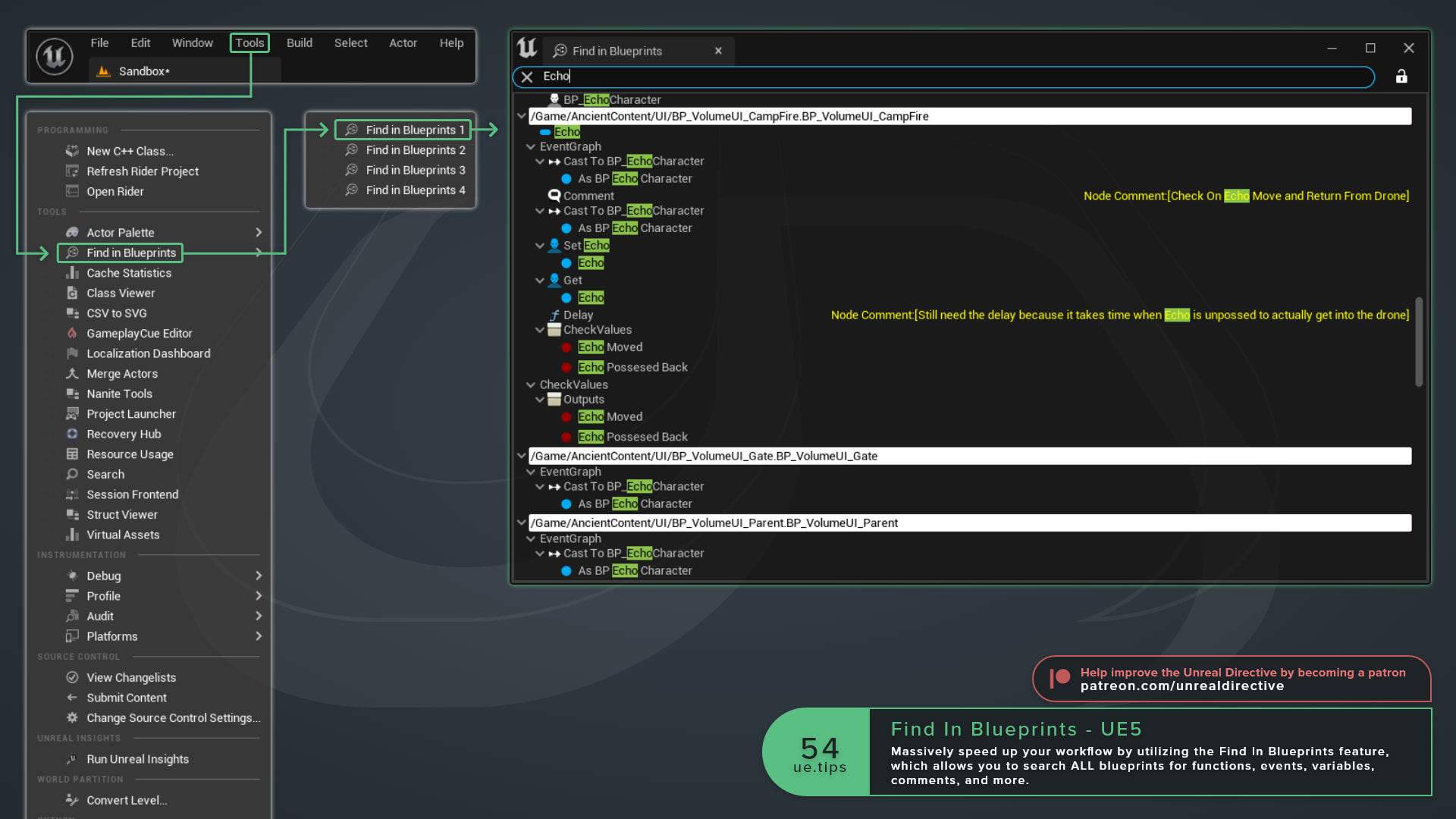
Massively speed up your workflow by using Find in Blueprints, which allows you to search every Blueprint in your project for functions, events, variables, comments, and more.
No need to search each Blueprint one by one ;)
Ctrl + Shift + F while in a Blueprint to open the Find in Blueprints window.How else can I open it?
There are a few related shortcuts and entry points worth knowing:
| Action | Shortcut | What It Does |
|---|---|---|
| Find | Ctrl + F | Searches the current Blueprint only. |
| Find in Blueprints | Ctrl + Shift + F | Searches all Blueprints. |
| Find References | Shift + Alt + F | Searches for references to the selected node or member. |
| Tools > Find in Blueprints | None | Opens a global search tab from the Level Editor without opening a Blueprint. |
If you started with Ctrl + F, the binoculars button next to the search field moves the current search to all Blueprints.
How can I narrow down a search?
Plain text searches everything that’s indexed, however, you can use filters to narrow the search to one part of a Blueprint, such as Nodes, Pins, Variables, Functions, or Components, and combine conditions with &&. For example, Nodes(Name=Coin) finds nodes with “Coin” in the name.
Thankfully, you rarely need to type this out yourself. Right-clicking a node or a My Blueprint entry and choosing Find References fills in the syntax for you.
Frequently asked questions
Can I have more than one search open?
Yes, up to four global search tabs at once, labeled Find in Blueprints 1 through 4.
Why are some Blueprints missing from my results?
Blueprints that were saved without search data, or saved in an older format, aren’t fully searchable. The results window offers an Index All button that loads them and builds their search data, and that indexed data only lasts for the current editor session unless the Blueprints are resaved.
Is Index All safe to run on a large project?
Keep in mind that Index All loads every affected Blueprint into memory, so it can stall the editor for a while on large projects. The Allow Index All Blueprints setting in the Blueprint Editor section of Editor Preferences controls whether it only loads them, or also checks them out and resaves them. The default is load only.
Links
Check out the following resources to learn more about the subject.
Unreal Directive is free and ad-free.
If it saved you time, you can help keep it that way.