

Lumen Hit Lighting Reflections
Get near ray-traced reflection quality from Lumen by switching its Ray Lighting Mode to Hit Lighting for Reflections.
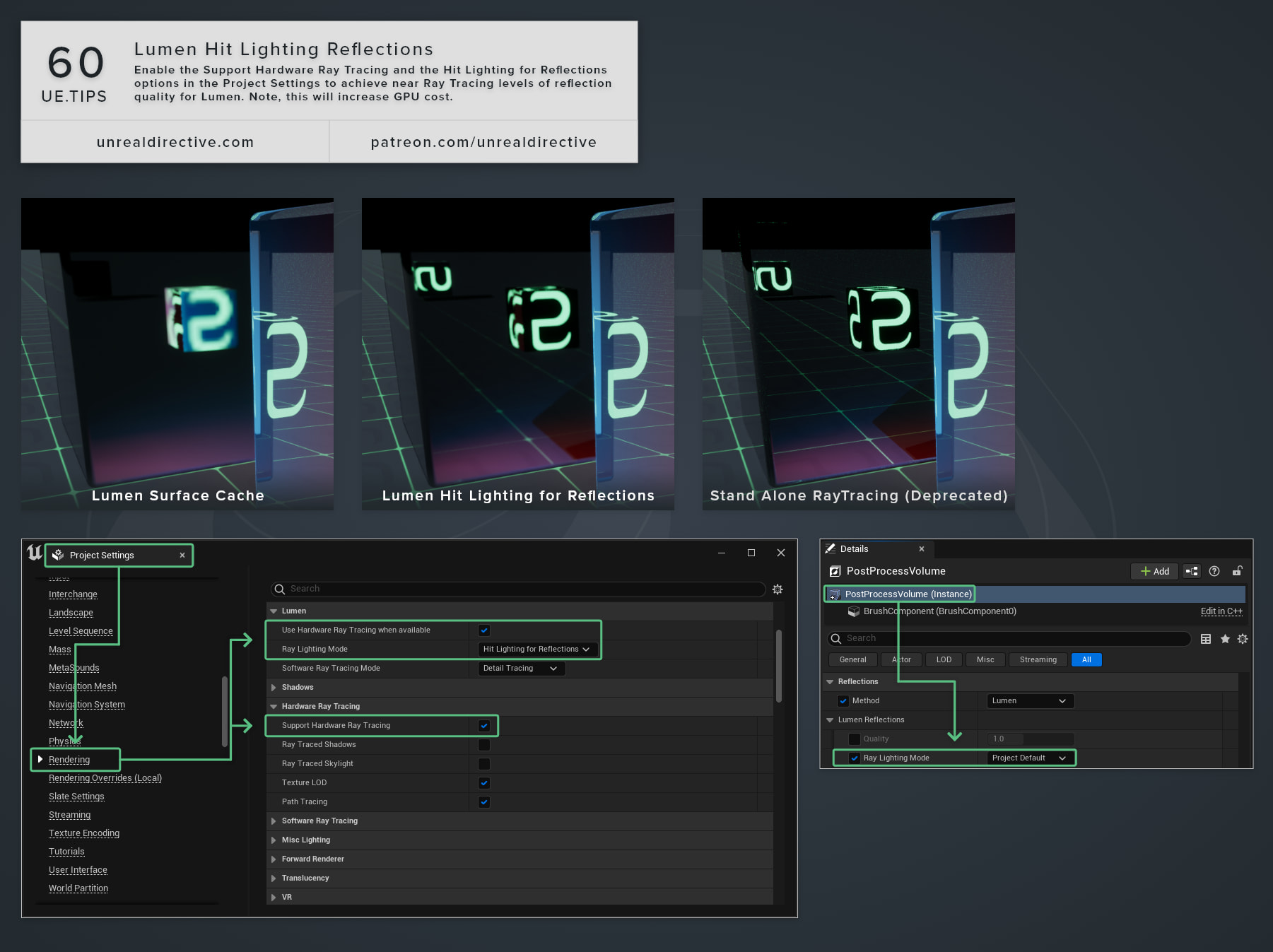
Set Lumen’s Ray Lighting Mode to Hit Lighting for Reflections to achieve near ray tracing levels of reflection quality. By default, Lumen lights its reflections from the Surface Cache, however, hit lighting evaluates the full material and lighting wherever a reflection ray lands instead.
Do note that enabling this will impact GPU performance.
How do I enable it?
In Project Settings > Engine > Rendering:
- Under Hardware Ray Tracing, enable Support Hardware Ray Tracing. This sets
r.RayTracingand needs an editor restart. - Under Lumen, enable Use Hardware Ray Tracing when available. This sets
r.Lumen.HardwareRayTracing. - Under Lumen, set Ray Lighting Mode to Hit Lighting for Reflections. This sets
r.Lumen.HardwareRayTracing.LightingModeto2.
What are the other Ray Lighting Modes?
There are three modes to choose from:
| Mode | Cvar Value | What It Does |
|---|---|---|
| Surface Cache | 0 | The default. Fastest, but quality depends on how well the Surface Cache represents the scene. |
| Hit Lighting | 1 | Hit lighting for both global illumination and reflections. Highest quality, and the most expensive. |
| Hit Lighting for Reflections | 2 | Hit lighting for reflections only. Global illumination, including GI seen in reflections, still uses the Surface Cache. |
Frequently asked questions
Why do my reflections still look like the Surface Cache?
New in Unreal Engine 5.8, the r.Lumen.HardwareRayTracing.HitLighting.Allowed scalability cvar gates hit lighting. It’s off at Global Illumination quality Medium and High, and on at Epic and Cinematic, so below Epic, Lumen falls back to the Surface Cache no matter what Ray Lighting Mode says.
Hit lighting also needs hardware that supports ray tracing shaders, and without that, Lumen uses the Surface Cache.
Can I use hit lighting in only part of my level?
Yes. A Post Process Volume can override the mode per area with its own Ray Lighting Mode setting under Global Illumination > Lumen Global Illumination.
How expensive is it?
Hit lighting increases GPU cost, since every reflection hit evaluates the full material and traces shadow rays. Hardware ray tracing also has a large scene update cost in scenes with more than 100,000 instances, so it’s ideal to profile before committing to it.
What if I use Lumen Reflections without Lumen global illumination?
In that case, Lumen forces Hit Lighting for Reflections.
Can I get more than one reflection bounce?
Max Reflection Bounces above 1 only works with hardware ray tracing and hit lighting.
Links
Check out the following resources to learn more about the subject.
Unreal Directive is free and ad-free.
If it saved you time, you can help keep it that way.