

Reclaim Diskspace Vault Cache
Reclaim hard drive space by clearing the Epic Games Launcher's Vault Cache.

When downloading and adding content from Fab (formerly the Unreal Engine Marketplace) to your project, it’s first stored in a local cache by the Epic Games Launcher. This allows you to re-add the same content to multiple projects without re-downloading it.
While this is great for reducing the bandwidth and time needed to add the content to new projects, it comes at a cost. That cost is storage space on your hard drive.
To see how much storage space your downloaded content is using, go to Unreal Engine > Library in the Epic Games Launcher and scroll down until your library of Fab content comes into view, labeled Fab Library in current launcher versions. Next to the Filter By section, you’ll see a cloud with a down arrow and a numeric value.
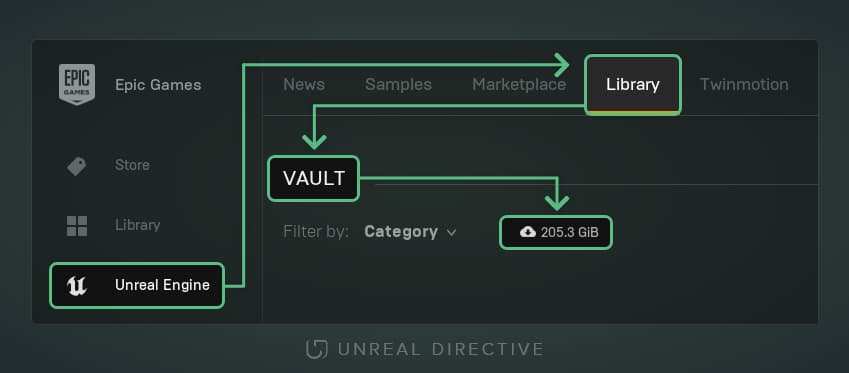
In the image above, 205.3GB of cache is being stored on the hard drive. To put this into perspective, that’s roughly 20% of a 1TB hard drive.
Here’s an example of how much space certain content packs take:
| Content Pack | Size |
|---|---|
| CitySample | 94.3GB |
| AncientGame | 90.5GB |
| CitySampleCrowd | 6.1GB |
| Lyra | 3.8GB |
How do I clear the cache?
There are two methods to find and clear the cached content packs.
Method 1: the Vault Cache directory
All of the cached content packs can be found in the Epic Games Launcher’s Vault Cache directory. By default, it’s here:
C:\ProgramData\Epic\EpicGamesLauncher\VaultCache
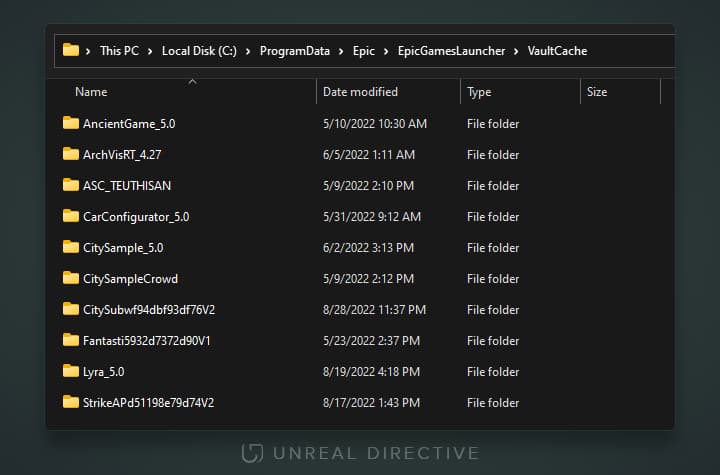
To clear the cache, simply select the folders in the VaultCache directory and delete them.
Method 2: manually find them in the Epic Games Launcher
The launcher has no filter for which items are cached, so this method requires you to manually hunt through your library.
The cached content packs display an active dropdown button along with their cached size.
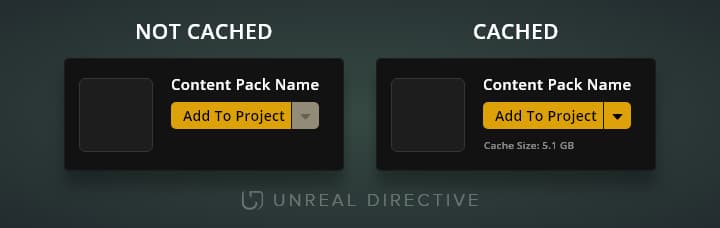
To clear the cache for a pack, click the active dropdown button and select Remove Local Content.
Will I lose the content?
No. Removed content downloads again the next time you add it to a project. And since the cache grows with every new pack you add, it’s ideal to clear it out now and then.
Links
Check out the following resources to learn more about the subject.
Unreal Directive is free and ad-free.
If it saved you time, you can help keep it that way.