

Save & Load Editor Layouts
Save your editor tab and panel arrangements as layouts and switch between them from the Window menu.
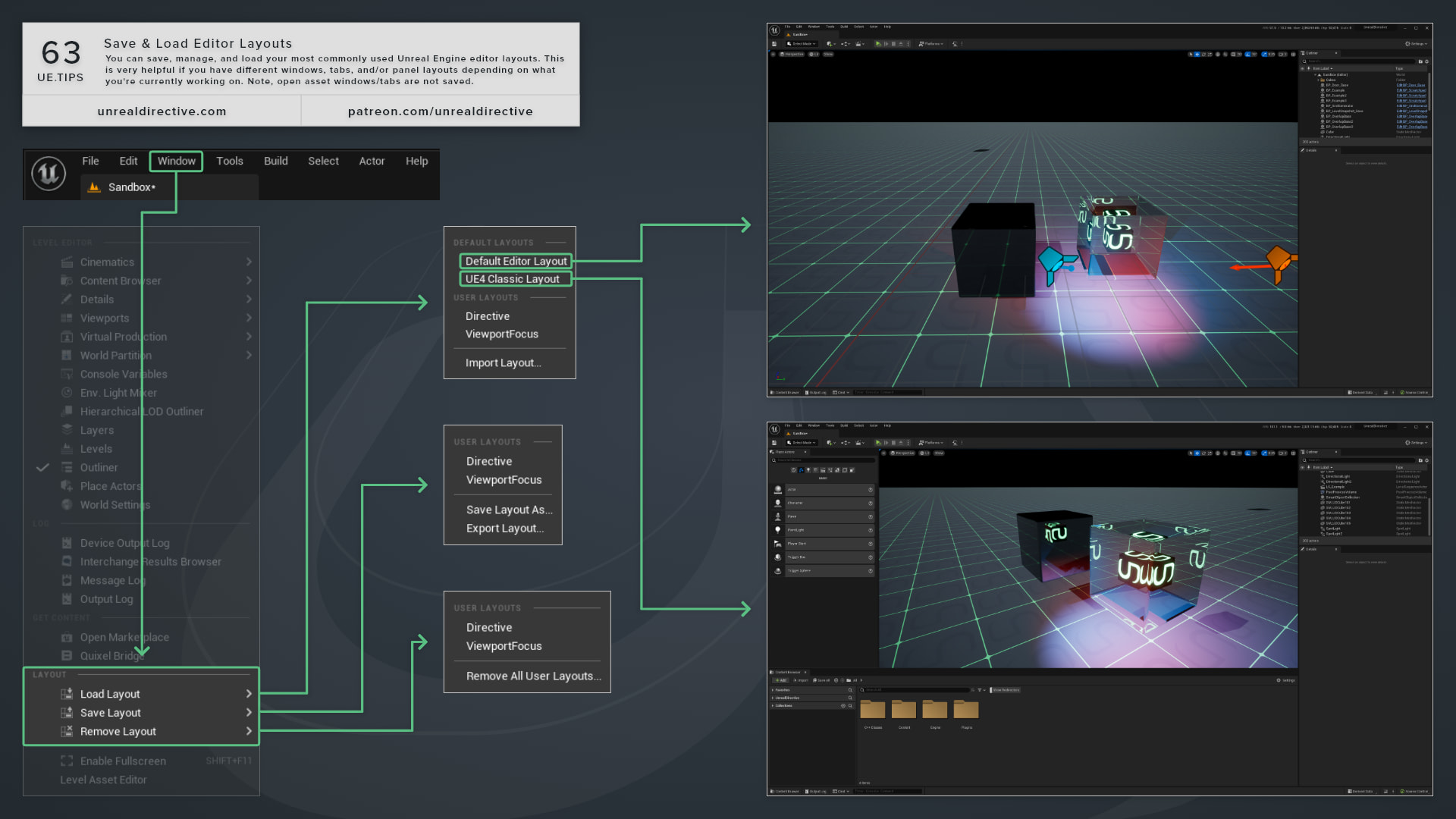
You can save, manage, and load your most commonly used Unreal Engine editor layouts. This is very helpful if you have different windows, tabs, and panel layouts depending on what you’re currently working on, such as level design, animation, or UI work.
You’ll find the layout options in the Layout section of the Window menu.
What’s in the Layout menu?
| Menu | Entries | What It Does |
|---|---|---|
| Load Layout | Default Layouts, <Project> Layouts, User Layouts, Import Layout… | Loads a saved layout. |
| Save Layout | Your user layouts, Save Layout As…, Export Layout… | Overwrites a user layout, saves the current layout under a new name, or exports a copy to another folder. |
| Remove Layout | Your user layouts, Remove All User Layouts… | Deletes saved layout files. |
Where are layouts saved?
Each section of Load Layout reads from its own folder:
| Section | Folder | Use |
|---|---|---|
| Default Layouts | Engine/Config/Layouts | Layouts that ship with the engine. |
<Project> Layouts | <Project>/Config/Layouts | Shown under your project’s folder name. Commit these to share a layout with your team. |
| User Layouts | The engine’s saved config folder, in Config/Layouts | Layouts you save with Save Layout As. |
Save Layout As only saves into the User Layouts folder, so use Export Layout to write a copy anywhere else, such as your project’s Config/Layouts folder, and Import Layout to bring it back in.
Frequently asked questions
Does a layout remember which assets I had open?
No. Layouts store the arrangement of tabs and panels, not which assets you have open.
What happens when I load a layout?
The editor asks you to close any running Play In Editor or Simulate session first. It then rebuilds its UI and reopens your open asset editors.
Why are Save Layout and Remove Layout missing?
They’re hidden when Enable User Editor Layout Management is off. You’ll find it under Editor Preferences > General > Appearance > User Interface, and it’s on by default.
Unreal Directive is free and ad-free.
If it saved you time, you can help keep it that way.